
Cash ↔ crypto
Sell crypto for cash. Step by step.
A Bitcoin ATM connects cash with your own wallet. Follow the steps one at a time.

Finland · new Bitcoin Guru ATMs
These steps describe the new Bitcoin Guru ATMs, the same as the instructions on the machines. The new ATMs are not in use yet; we will announce the opening date.
The earlier Bittimaatti ATMs are retired one by one from 20 November 2026. Instructions for the earlier ATMs (archive) →
Reading through the steps below will help you become comfortable with the machine. Have your wallet ready and your phone with you for identity verification.
Know the machine before you start
Select a number on the machine to see what it does. The drawing is simplified; the parts are in the same order as on the real machine. Prices shown on the drawing are examples.
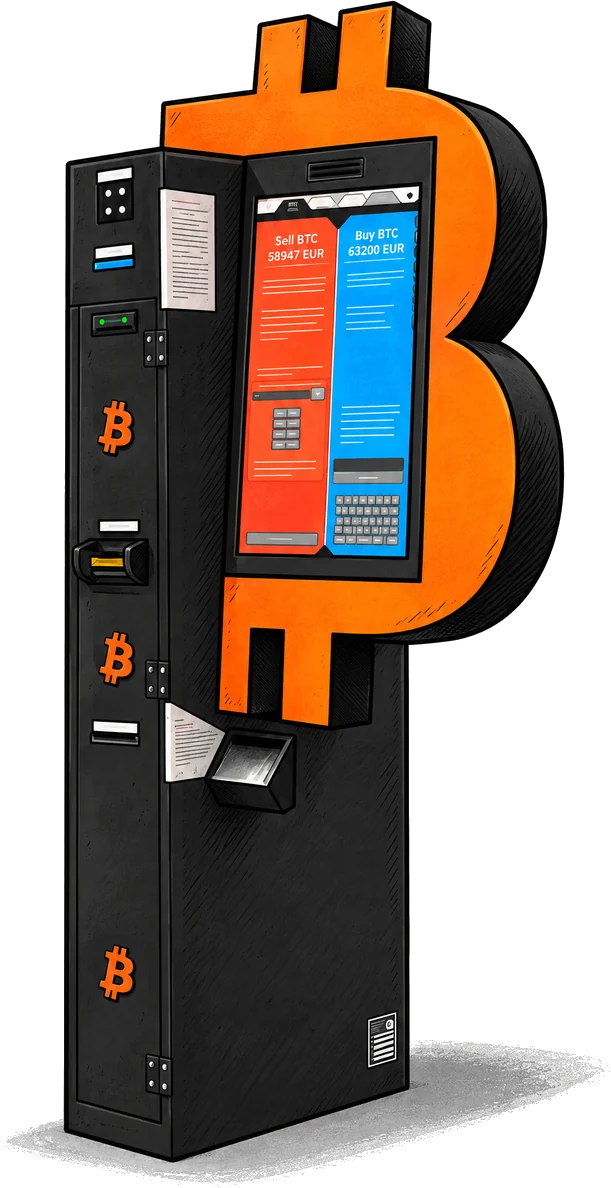
1Barcode and QR scanner
Show the QR code from your wallet here. When you buy, this is how the machine learns where to send your crypto.
2Printouts
The receipt comes out here. Keep it until the transaction is confirmed.
3Cash in
Insert banknotes here when buying. Do it only after checking the receiving address on the screen.
4Cash out
Take the banknotes from your sale here, after the machine confirms the payout.
What is on the screen
- Cryptocurrency tabs
- Choose the cryptocurrency you want to buy or sell.
- Sell and buy prices
- Both prices for the chosen cryptocurrency. They are not the same.
- Cash in the machine
- How much cash the machine can pay out. If it is low, sell a smaller amount.
- Exact amount
- Optional when selling: enter the cash amount you want before you tap “Show QR code”.
- Keyboard
- For amounts and details. Check each number before you confirm.
- Language flags
- Change the language of the screen at any time.
- Network
- Send crypto only on the network the machine shows. Another network can lose the funds.
- Contact details
- Support contact details appear at the top of the screen.
Before your first visit
Bring your phone, your own receiving address and a valid passport or identity card. Every transaction needs identity verification, from €0: at the ATM you enter your phone number and an SMS code, and if the ATM asks you to register, you finish registration in Sumsub on your phone and then start again. Use a wallet you control yourself, not an exchange account, and know how to use and back it up.
Who can use the service?
The current Bittimaatti instructions list citizens of EU countries and these countries:
Albania, Algeria, Andorra, Australia, Brazil, Canada, Egypt, Hong Kong, Iceland, Israel, Japan, Kosovo, Liechtenstein, Monaco, Norway, San Marino, Serbia, Singapore, Switzerland, Thailand, Turkey, United Kingdom and Ukraine.
Confirm current eligibility and document requirements before travelling.
Identification guide →What does identification require?
- A phone that receives text messages and has a camera.
- A valid passport or identity card, for example an EU/EEA national identity card. Driving licences are not accepted.
- Identity, address and tax details, plus answers about your source of funds and intended use. The process includes a face scan.
How long can verification take?
Automated light checks run around the clock. Missing information can require manual review. Enhanced verification is processed on weekdays, 08:00–16:00 Finnish time.
The current instructions describe a €1,000 verification threshold: enhanced checks also cover your wallet and its holder. This is neither an identification-free allowance nor a daily limit.
Can I bring a printed QR code?
You can bring a printed QR of your own receiving address. You still need your phone for identity verification. Never use a stranger’s code, recovery QR or private-key QR.
Check your wallet →What does controlling your wallet mean?
With a self-custody wallet, you control the private keys and must keep a secure backup. With a custodial service, the provider manages the keys and may restrict access or withdrawals. This distinction concerns control of the keys; it does not by itself determine legal ownership of the assets.
Wallet apps are third-party services. Learn how yours works before visiting. The ATM cannot undo a blockchain transfer to the wrong address.
Check your wallet →Light-verification details
- Your name as shown on your identity document, personal identification number, document-issuing country, country of birth and nationality.
- Your tax identification number and home address, postcode and city. Confirm your phone number.
- A face scan and a scan of your valid identity document. Customer-information questions cover employment, the main source of funds and why you use the service.
Enhanced-verification details
- Once your use reaches €1,000, continuing requires enhanced verification. This includes a face scan, nationality, date of birth, home address, postcode, city and primary country of taxation.
- The fuller customer-information form asks about your assets, expected use and purpose. The wallet-verification form asks about the wallet used for your transactions and its holder.
- Automated light checks run 24/7; incomplete information can need manual handling. Enhanced verification is processed on weekdays, 08:00–16:00 Finnish time.
Before you go
Check if you are ready
Four checks for a smoother visit.

Use a wallet you control. Check that it can receive the exact cryptocurrency and network offered by the ATM.
Check your walletCheck the entrance and the venue’s opening hours, and read the status on the location page: it says whether the ATM is in use. If you are selling crypto for cash, the ATM must hold enough notes for your withdrawal; check on the ATM screen that your amount is available before you send anything.
Find an ATMOn the new Bitcoin Guru ATMs, identity verification is required from €0. You enter your phone number and an SMS code at the ATM; if the ATM asks you to register, you finish registration in Sumsub on your phone and then start again on the ATM. Bring your phone and a valid passport or identity card.
See the identification stepsCompare what you pay with what you receive, including the service fee and any network fee. Read how the price is made up beforehand, then check the final exchange quote on the ATM screen. Stop before inserting cash or sending crypto if anything is unclear.
Understand the feesBitcoin network fees
The network fee depends on how busy the Bitcoin network is. The ATM shows the exact fee before you confirm.
Loads from mempool.space only when you press the button.
Crypto → cash
Sell for cash.
At the ATM To identify yourself by phone, enter your phone number and the code you receive by SMS. If you are already registered on the new ATMs, you can also identify yourself by scanning your ID card at the ATM.
Asked to register? Scan the QR code on the screen with your phone, then tap OK on the ATM. Finish registration in Sumsub on your phone. Once approved, start again on the ATM.
Used the earlier Bittimaatti ATMs? Your earlier registration is not enough: you need to verify your identity again. Register when the ATM asks you to, or ask us for a registration link before your visit.
Registration and identity verification: full guide →Step 1 / 4
Select your cryptocurrency and network.
On the ATM screen, select the cryptocurrency and network you will send. Check the price and fees on the screen. Do not send anything yet.
Step 2 / 4
Tap “Show QR code” and keep the printout.
Tap “Show QR code” and keep the printout: you need it again to collect the cash. If you want a specific cash amount, enter it first.
Step 3 / 4
Send the crypto from your wallet.
To send crypto, scan the printed QR code with your wallet. Check the address, network and amount, then send. Keep a little extra in your wallet for the network fee so the payment is not short. Never reuse an old code.
Step 4 / 4
Wait for confirmation, then collect your cash.
To collect cash, wait for network confirmation; this can take time, and you should not send a second payment while the first is still processing. Then scan the barcode below the QR code on your printout at the ATM and take your cash.
Cash → crypto
Buy with cash.
At the ATM To identify yourself by phone, enter your phone number and the code you receive by SMS. If you are already registered on the new ATMs, you can also identify yourself by scanning your ID card at the ATM.
Asked to register? Scan the QR code on the screen with your phone, then tap OK on the ATM. Finish registration in Sumsub on your phone. Once approved, start again on the ATM.
Used the earlier Bittimaatti ATMs? Your earlier registration is not enough: you need to verify your identity again. Register when the ATM asks you to, or ask us for a registration link before your visit.
Registration and identity verification: full guide →Step 1 / 3
Show your wallet’s receiving QR code.
Open “Receive” in your wallet. Let the ATM scan your QR code, or enter your wallet address manually. Use only your own wallet, and make sure it supports the cryptocurrency and network you are buying.
Read more about how to do it here ↗Step 2 / 3
Insert cash and send.
Insert cash. Check the address, network and amount on the screen, then tap “Send cryptocurrency”. Stop and contact support before paying if anything is unclear.
Step 3 / 3
Keep your receipt.
Keep your receipt while you wait for the crypto to reach your wallet; network confirmations can take some time. The receipt identifies your transaction if you need help. Never share your wallet recovery phrase.
You can get help with your transaction, too.
Contact support during its published hours if you need help using the ATM. If a transaction has already started, keep its reference. Never send a second payment to “unlock” a first one.
Customer support
Phone (in English)
+358 9 81710355Monday to Friday 11:00–21:00, Saturday and Sunday 11:00–15:00 Finnish time
- [email protected] (English)
- [email protected] (Finnish)
Messages are answered by the next business day at the latest.
Problem with a transaction?Transaction claim form →
Know the service you are using.
Bitcoin Guru in Finland is provided by Bittimaatti Oy. Read the company’s current documents before making a transaction. The new name does not by itself change your contract or the company responsible for an earlier transaction.